A lightweight model router for Gemini agents on CPU-only Cloud Run

On 3 October, I gave a talk at GDG DevFest Melbourne 2026 called Token-Maxxing Is Not a Strategy: Getting More Value per Token on Google Cloud. This post covers the core idea behind it and the weekend project I cobbled together to see if it actually worked.
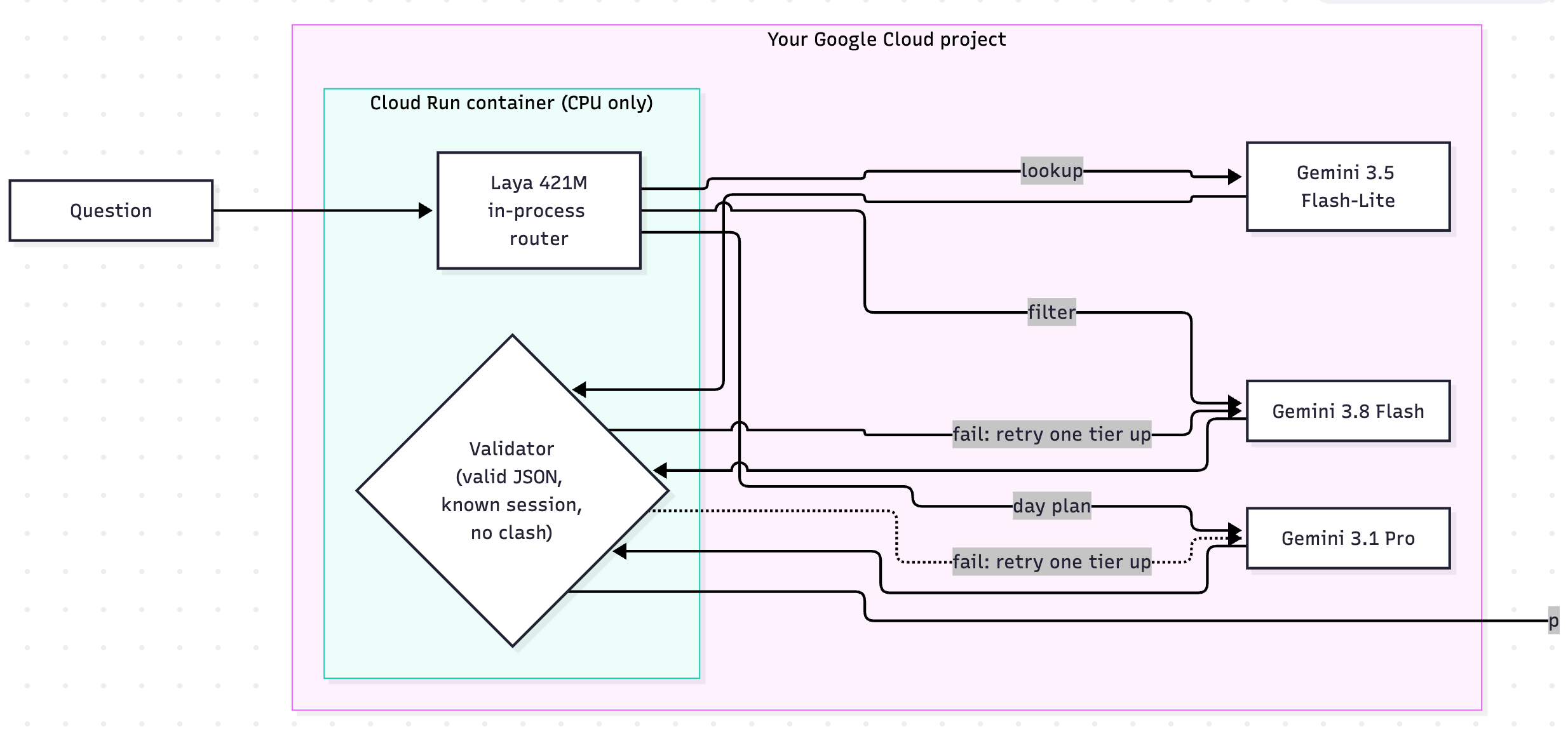
When you run an agent on Google Cloud, the model is usually where your budget goes to die. Send every request to the top-tier models, and you're paying frontier prices for questions a cheaper model could handle with no issues. The intuitive fix is simple: route a quick fact-check goes to Flash-Lite, a filter goes to Flash, and a hard planning task goes to Pro.
The real catch is where that routing decision happens.
I borrowed the core concept from TypeSafe's hosted "System One" classifier, Jev, which uses a tiny model to inspect the prompt and return typed probabilities in a single pass before the big model steps in.
But Jev lives on a third-party API, which defeats the purpose if you're running on Google Cloud to keep your data contained. Open-source alternatives like OpenJev (an independent project, not TypeSafe's), solve the hosting problem, but require heavy hardware (like an 80GB H100) and carry non-commercial licenses.
That brought me to Laya, a 421M parameters decision model under an Apache-2.0 license. Because it’s tiny and runs purely on CPU via a simple pip install laya, you can bake the weights directly into a standard Cloud Run container without needing a GPU or expensive infrastructure.
Let's dive into a lab to see how it works.
How little code it takes
The demo is a "DevFest Helper", a Google ADK agent that answers questions about the DevFest Melbourne 2026 schedule. The entire router fits inside a single before_model_callback:
from google.adk.agents import LlmAgent
from laya import Router

router = Router()  # downloads the ~800 MB checkpoint once; runs on CPU, or a GPU if there is one
QUESTIONS = {"day_plan": {"type": "noul",  # a yes/no question, answered as a probability
                          "instructions": "Is the attendee asking to organise their whole day?"}}

def before_model(callback_context, llm_request):
    question = llm_request.contents[-1].parts[0].text
    p_plan = router.predict(question, QUESTIONS)["answers"]["day_plan"]["noul"]
    llm_request.model = "gemini-3.1-pro-preview" if p_plan >= 0.3 else "gemini-3.8-flash"

root_agent = LlmAgent(name="devfest_helper", model="gemini-3.8-flash", before_model_callback=before_model)
Because Laya runs in-process as an ordinary Python dependency, prompts never leave your GCP project just to figure out where to go.
To split traffic cleanly across three tiers, I pass two lightweight questions in one shot: one checking if they need a full itinerary, and another bucketing the task into a quick fact or a general search.
LAYA_QUESTIONS = {
    "day_plan": {
        "type": "noul",
        "instructions": "Is the attendee asking to organise their whole day, with rules such as arrival or "
                        "leaving times, topic preferences or talks to avoid?",
    },
    "task": {
        "type": "choice",
        "instructions": "What kind of help is the conference attendee asking for?",
        "criteria": {
            "quick_fact": "short question with a single answer: a room, a time, a speaker, or what is on right now",
            "search": "find every talk matching a filter like topic, level, room, before or after lunch",
            "itinerary": "long request to organise my whole day: one talk per slot, preferences in order, "
                         "things to avoid, must-see talks",
        },
    },
}
PLAN_THRESHOLD = 0.3
That exact same callback also sets the schedule cache, thinking level, JSON response schema, and billing labels. One quick Laya pass configures the entire request.
Runs on CPU, which is the whole point on Cloud Run
Running at 421M parameters means no GPU begging, no quota headaches, and no exotic runtime flags. It fits right inside standard Cloud Run CPU instances.
To keep cold starts reasonable, I baked the ~800 MB weights directly into the container image instead of pulling them down at boot:
FROM python:3.13-slim
# CPU-only PyTorch first, so laya doesn't pull the multi-GB CUDA build.
RUN pip install torch --index-url https://download.pytorch.org/whl/cpu
COPY requirements.txt /tmp/requirements.txt
RUN pip install -r /tmp/requirements.txt
# Bake the Laya checkpoint (~800 MB) into the image, so a cold start doesn't download it.
RUN python -c "from laya import Router; Router().predict('warm-up', {'q': {'type': 'noul', 'instructions': 'Is this a test?'}})"
Deploying to Cloud Run is a single command with no GPU flags required:
gcloud run deploy devfest-helper --source . --project $GOOGLE_CLOUD_PROJECT --region $REGION \
  --no-allow-unauthenticated --cpu 4 --memory 8Gi --execution-environment gen2 \
  --min-instances 0 --max-instances 2 --concurrency 4 --timeout 300 --cpu-boost \
  --set-env-vars GOOGLE_CLOUD_PROJECT=$GOOGLE_CLOUD_PROJECT,GOOGLE_GENAI_USE_VERTEXAI=TRUE,GOOGLE_CLOUD_LOCATION=global,ROUTER=laya,TIERS=3,OMP_NUM_THREADS=4,MKL_NUM_THREADS=4,HF_HUB_OFFLINE=1,TRANSFORMERS_OFFLINE=1
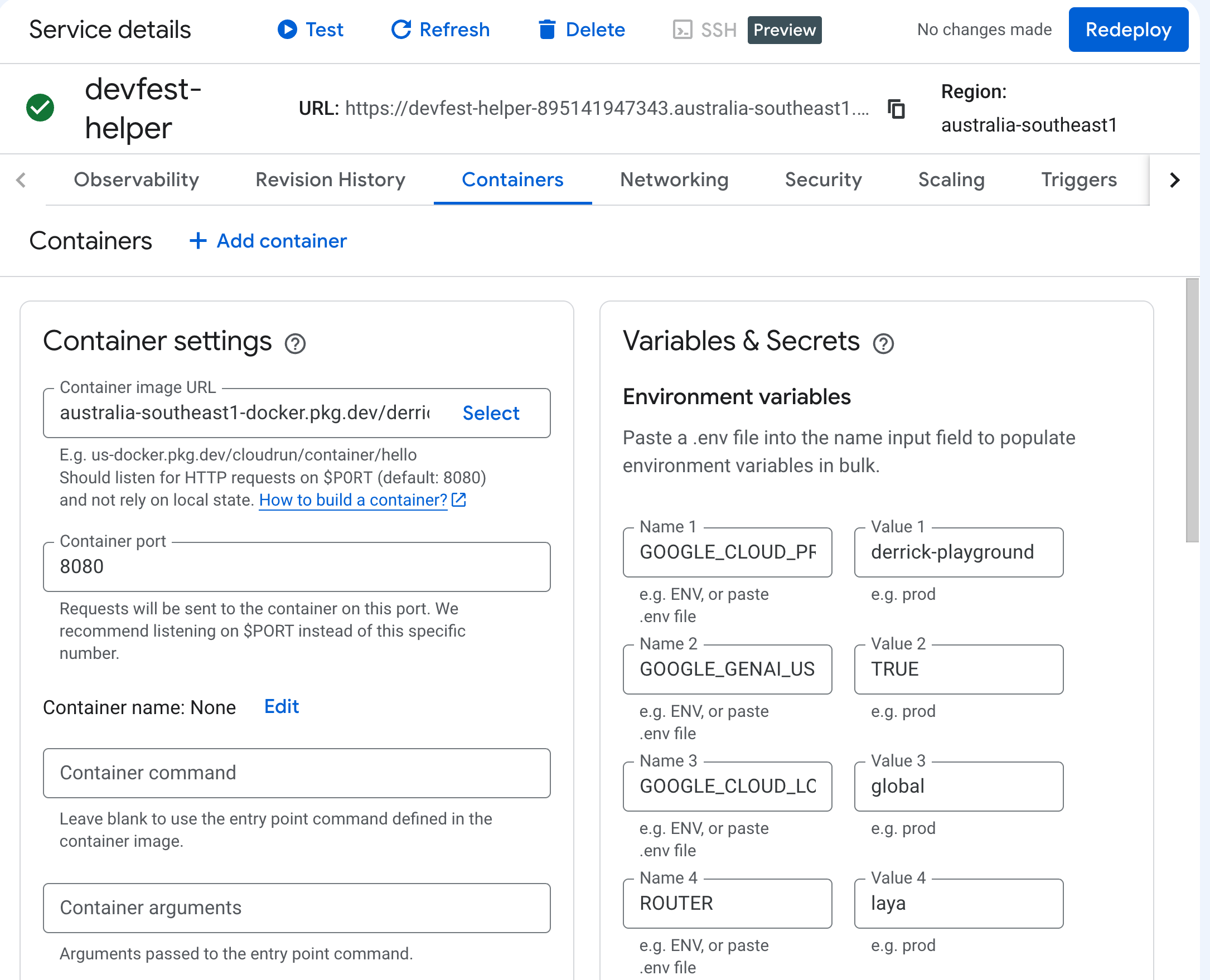
Here’s how the numbers shook out on a 4 vCPU / 8 GiB Gen2 instance:
| Metric | Performance |
|---|---|
| Laya decision | |
| Round trip, Flash-Lite / Flash | ~4–5 s - the Gemini call dominates, not the router |
| Router compute | ~$0.00003 per decision (estimated: a 1 vCPU / 2 GiB share at request-based prices) |
| Cold start | ~30 s to load Laya; --min-instances 1 removes it, but bills continuously |
The router burns around ~1.0 s of CPU time for roughly a fraction of a cent ($0.00003). Compared to the 4-5 seconds spent waiting on Gemini, that upfront second is a worthwhile tax if it keeps you off the expensive tier. If you run --min-instances 0 to keep idle costs at zero, expect that initial 30-second cold start while Laya loads into memory.
Does the router actually save money? Don't guess, eval it!
Building a router is easy; proving it doesn’t secretly blow up your bill is the stressful part. A classifier that makes confident mistakes will burn cash faster than just sending everything to Pro models.
To test this honestly, I wrote an eval harness and ran every test question through each tier once, then cached the outputs so I could pit always-Pro, regex/keyword matching, and Laya against identical runs.
The eval set covered three kinds of inputs:
105 templated questions: "Which GCP talks are before lunch?"
30 reworded questions: "What GCP sessions can I hit before lunch?"
45 messy prompts: "morning schedule check: any gcp sessions running before lunch today?" or a day plan that never actually uses the word "plan".
I added that messy set after the talk because someone in the audience rightly called me out: on an app this small, wouldn't a basic keyword regex do the exact same thing for free?
On clean inputs, yes. On real-world prompts, absolutely not.
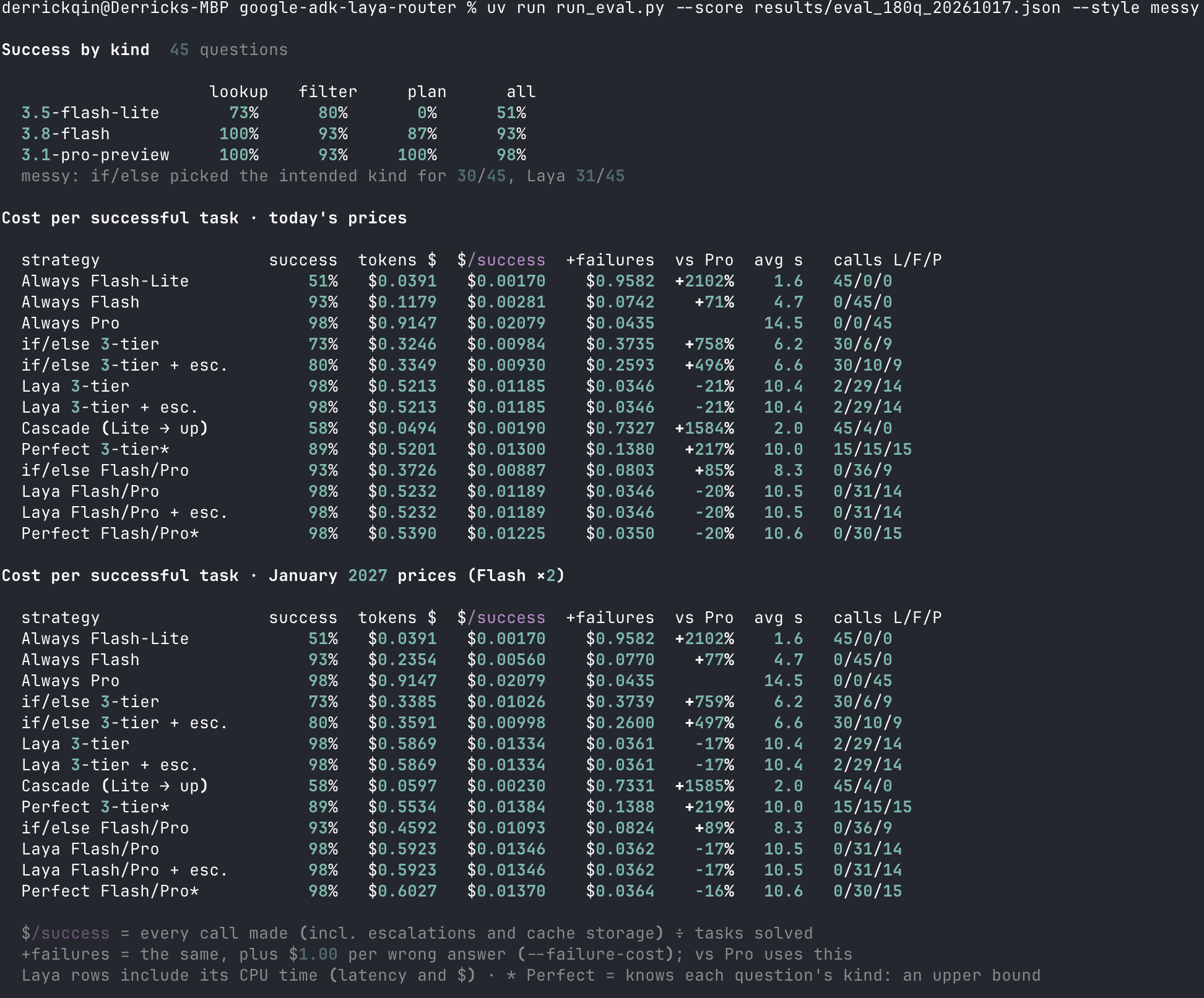
To score them, I tracked cost per successful answer—total tokens, cache overhead, plus a $1 penalty for every wrong answer (toggled via --failure-cost).
| Strategy | Success, reworded | Success, messy | vs always-Pro, reworded | vs always-Pro, messy |
|---|---|---|---|---|
| Always Flash | 97% | 93% | +95% | +71% |
| Always Pro | 100% | 98% | — | — |
| if/else 3-tier | 83% | 73% | +988% | +758% |
| if/else Flash/Pro | 100% | 93% | −41% | +85% |
| Laya 3-tier | 100% | 98% | −37% | −21% |
| Laya Flash/Pro | 100% | 98% | −36% | −20% |
On the messy questions, Laya 3-tier was as accurate as always-Pro (44 of 45) at 21% lower cost per successful task. The keyword router that tied it on the reworded set ended up 85% more expensive than always-Pro.
A few honest surprises from running these evals:
Keywords fall apart the second humans start typing. A simple keyword router easily aced the clean questions. But on the messy set, someone wrote "line up back to back sessions" instead of "plan my day." The if/else router sent it to Flash, Flash failed, and just two bad answers spiked its cost relative to Pro from −41% to +85%. Laya caught 14 of those 15 edge cases without explicit keyword matching.
Flash-Lite can be a trap. On paper, Flash-Lite looks like a no-brainer for cost. In practice, it failed on 57% of generic queries and 10% of plans by returning clean, well-formatted nonsense. Cheap and wrong is the most expensive combination in production.
Output validators won't save you from logic errors. I tried adding a schema validator to catch broken itineraries and time clashes. It did nothing because Flash-Lite’s incorrect answers looked completely plausible on the surface. If your validator doesn't hold the ground-truth schedule, it only catches syntax crashes, not wrong information.
The nuance here comes down to what a bad answer actually costs you. If a failure costs $0, always-Flash or a naive if/else rule will look cheaper purely because they dodge Pro. But the moment getting an answer wrong carries real business cost ($0.10 to $1.00), a small semantic classifier is the only setup that consistently beats always-Pro.
Summary
Routing isn't just about slicing token bills, it's about building agents that degrade gracefully under unpredictable prompts.
What surprised me most wasn't that a 421M model worked on Cloud Run CPU, but how quickly rule-based keyword shortcuts broke when faced with real phrasing. Putting a tiny decision model in front of Gemini kept the whole setup self-contained, cheap, and surprisingly resilient.
Keep in mind this was built as a proof-of-concept for the talk (it handles single-turn queries and uses basic globals). If you want to poke at the eval harness or run the benchmarks yourself, check out the code on GitHub at google-adk-laya-router (make sure to pin laya==0.3.23).
Comments
Join the discussionNo comments yet. Be the first to comment.